


Pregnancy App & Baby Tracker
4.77.92K Reviews
App Specs
- Version
- 7.1.1
- Updated On
- License
- Free
- Downloads
- 1,000,000+
- Developer
- The Bump
- Categories
- Parenting
- Platform
- Android
Screenshots
 Analysis by AppCompare
When I think about a pregnancy tracker, the most useful job it can do is give a changing week-by-week experience a clear rhythm. Pregnancy App & Baby Tracker is built around that idea: it follows the pregnancy stage and gives you a way to learn about development as the weeks pass. I find that focus more valuable than trying to turn every question into a task to complete. It can make a big, sometimes hard-to-picture change feel easier to follow, while still leaving health decisions where they belong: with you and your care team.
Why weekly development is the app’s defining strength
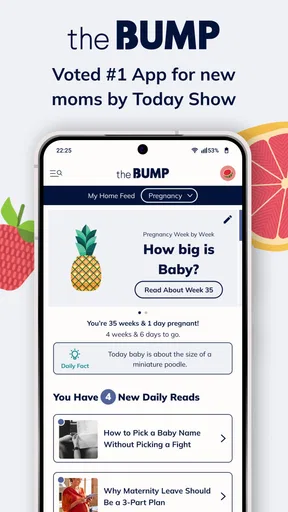
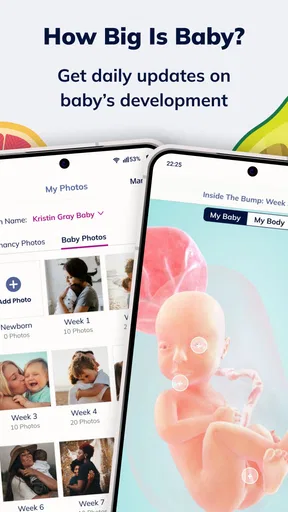
The weekly updates are the capability I’d build a routine around. Rather than opening a tracker only when a symptom worries you, you can return to it at a steady point in the week and see a new snapshot of your baby’s development. The illustrations and comparisons give you something concrete to picture; the accompanying explanations and facts can help turn a quick check-in into a small learning moment.
That kind of structure matters because pregnancy can feel both slow and fast. A week may bring no obvious change in your day, yet the app gives you a way to notice the larger timeline. I like that as a prompt for curiosity, not as a scorecard. Development comparisons are simplified pictures, not literal measurements of your baby, and they shouldn’t be treated as a diagnosis or a substitute for an appointment.
Making a useful routine without turning it into homework
I’d use the update as a short weekly ritual: read the new development note, save a question that comes to mind, then bring that question to a midwife or doctor if it concerns your health. This is a more grounded use than scrolling through every section whenever anxiety rises. A tracker can organize what you want to learn, but it cannot tell you whether a particular symptom is safe or what care you personally need.
For a partner, the same weekly check-in can be an easy way to stay involved without expecting them to absorb a whole pregnancy handbook. You can share the broad idea of what you read and use it as a conversation starter. I’d still keep individual medical advice personal: an app’s general information cannot account for someone’s history, test results, or clinician’s guidance.
One practical tip is to choose a predictable time to open the app, rather than letting notifications set the pace. That makes the weekly material feel like a reference you control. If an update sparks a question, write it down for your next appointment instead of relying on memory in the moment. This simple habit can make the app more useful while keeping it from becoming another source of pressure.
Getting Started with the App
First things first, downloading the Pregnancy App & Baby Tracker is a breeze. Available on both Android and iOS, it’s just a quick tap away from becoming your daily companion. Once installed, you’ll be greeted with a clean and friendly interface that makes navigation feel like a walk in the park.
Worth Reading Before You Choose

EA SPORTS FC Mobile 26 Is a Bigger Football Game, but It Takes Time

Flipboard Shows What News Apps Must Do Beyond the Feed

Switching to Android Auto Means Rethinking Your Driving Routine

Google Calendar Makes a Crowded Week Easier to Manage

Ludo King Makes the Most of the Minutes Between Plans

Baby Panda World Brings Quick Play to Modern Phones, but Its Game Library Feels Busy
Setting up your profile is straightforward. You enter your due date, and voilà, the app customizes everything according to your pregnancy stage. From tracking your baby’s growth to monitoring your own health, it’s like having a digital doula at your fingertips.
Features That Stand Out
One of the standout features is the weekly updates. Each week, you get a detailed breakdown of your baby’s development. It’s fascinating to see how your little one is growing from a poppy seed to a watermelon. Plus, the app includes vivid illustrations and fun facts that make learning about your pregnancy both educational and entertaining.
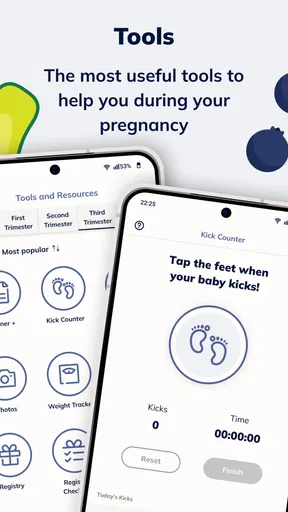
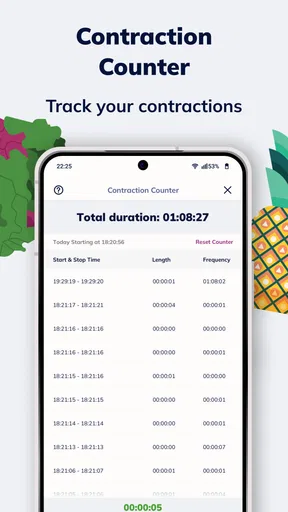
The kick counter and contraction timer are lifesavers. Trust me, when those kicks start coming, you’ll want to keep track. And when it’s go-time, the contraction timer is super handy to have on hand. It’s like having a mini birthing coach right in your pocket.
Health and Lifestyle Tips
Another cool aspect of this app is the daily tips. Whether it’s advice on nutrition, exercise, or mental health, it covers all bases to ensure you’re taking care of yourself and the baby. The tips are practical and relatable, perfect for those moments when you need a little nudge in the right direction.
The app also offers a food guide, which is a great resource for those "can I eat this?" moments. It’s all about keeping you and your baby healthy while still enjoying your favorite meals.
Community and Support
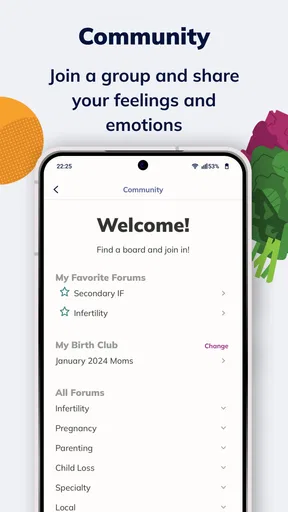
Feeling connected during pregnancy is essential, and the app doesn’t disappoint. It features a community section where you can chat with other parents-to-be, share experiences, and ask questions. It’s comforting to know you’re not alone on this crazy, beautiful ride.
There’s also a section dedicated to partners, which is a thoughtful addition. It provides insights and suggestions for partners to support you better, keeping them involved and informed throughout the pregnancy.
A Few Thoughts on Usability
The app is user-friendly, with intuitive navigation and clear menus. It’s designed to be accessible even for those who might not be tech-savvy. The layout is aesthetically pleasing, with soothing colors and easy-to-read fonts.
One thing to keep in mind is the plethora of notifications. While it’s great to stay informed, it can sometimes feel a bit overwhelming. Luckily, you can customize these alerts to suit your preferences, ensuring you receive only the information that matters most to you.
Where it fits among pregnancy tools
Pregnancy apps often fall into two camps: simple week counters that show a changing date, and broad collections of articles or trackers that can take more effort to navigate. This app sits closer to the all-in-one side, but the weekly development view gives it a natural starting point. If you mainly want a calendar reminder, a basic tracker may be calmer and quicker. If you enjoy pairing a weekly update with practical tools and community, the wider collection here may feel more worthwhile.
In a realistic day-to-day situation, imagine checking the new update over breakfast, then using the food guide later when you’re unsure about a meal. If a question still bothers you, note it for your next appointment rather than treating the guide as a personal medical ruling. Later, a partner can read the weekly material with you, while the kick counter or contraction timer becomes relevant only when you have a reason to use it. The benefit is having different kinds of pregnancy support in one place; the trade-off is that not every section will matter at every stage.
What to expect from the tools and community
The kick counter and contraction timer are best thought of as practical aids, not as a replacement for care instructions. If a clinician has told you how to monitor movement or when to call about contractions, follow that advice first. The app can help you keep track when you need to, but a timer cannot judge what is happening or decide whether a change is urgent. I’d treat its role as helping you observe and communicate, not interpret symptoms.
The community can be reassuring when you want to hear how other parents are handling ordinary uncertainty. It is also a place where experiences may differ sharply, so I would read personal stories as conversation, not evidence or individualized guidance. If comparing experiences tends to make you more anxious, it is completely reasonable to skip that section and use the tracker for its weekly material instead.
People often wonder whether this is useful only for a first pregnancy. I don’t think so: someone who already knows the basics may still like the weekly timeline, food reference, and partner-facing material, while a first-time parent may appreciate having several starting points in one app. The difference is how much explanation you want. If you already have a preferred source and need only a particular tracking tool, a narrower app may be less distracting.
Where the convenience has limits
Having pregnancy information, lifestyle tips, a food guide, a community, and tracking tools together saves switching between separate resources. The flip side is that a broad app can present more material than you need on a given day. I would not try to keep up with every tip or notification. Choose the parts that answer a current question, adjust alerts if they interrupt you, and let the rest wait.
It also helps to remember that pregnancy timelines are personal. A due date gives the app a way to organize its material, but the experience it describes will not match every person exactly. If an illustration or weekly comparison does not line up with what you feel, that alone is not a reason to worry. Bring concerns to a qualified professional rather than using a general tracker to resolve them.
Who is most likely to enjoy it
I’d recommend this app to someone who likes a weekly sense of progress and wants pregnancy information alongside practical references, rather than a bare countdown. It may be especially handy if you want to share a simple learning routine with a partner or prefer to keep a food guide and tracking tools close by. The app is free, rated for Everyone, and made by The Bump; it has a 4.7 average from around 34,000 ratings and over a million installs. Those figures suggest a widely used option, though they cannot tell you whether its tone and layout will suit you personally.
It is less suited to someone who wants only clinician-directed monitoring, dislikes community features, or finds frequent prompts stressful. In those cases, a paper note, a basic calendar, or a focused tracker used alongside professional care may be a better fit. The current version is 7.1.1, and the app has been available since September 8, 2013; it supports operating systems from version 9 onward. I’d check that your device meets that requirement before making it part of your routine.
Wrapping It Up
In a nutshell, the Pregnancy App & Baby Tracker is packed with features that make it a fantastic tool for expecting parents. It’s like having a personal pregnancy assistant available 24/7. From tracking your baby’s growth to connecting with a community of parents, it offers everything you need to navigate those nine months with confidence and ease.
If you’re looking for an app that combines functionality with community support and expert advice, this one should be on your radar. So, why not give it a whirl? Your pregnancy journey might just become a lot more exciting and a little less daunting.
Pros
- User-friendly interface for easy navigation.
- Comprehensive week-by-week pregnancy info.
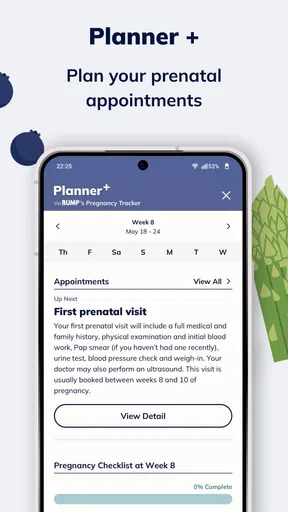
- Customizable reminders for appointments.
- Daily tips and health advice.
- Integration with wearable devices.
Cons
- Limited features in free version.
- Requires constant internet connection.
- Occasional ads can be intrusive.
- Some features only in premium plan.
- May consume significant battery life.
FAQs for Pregnancy App & Baby Tracker
What features does the Pregnancy App & Baby Tracker offer for expecting parents?
The Pregnancy App & Baby Tracker provides expectant parents with weekly updates on fetal development, a pregnancy timeline, and a kick counter. It also includes a contraction timer, a weight tracker, and helpful articles on prenatal care. Additionally, users can access a community forum to connect with other parents.
Is the Pregnancy App & Baby Tracker suitable for first-time parents?
Absolutely! The app is designed with first-time parents in mind, offering easy-to-understand guides, expert tips, and a clear layout. With its user-friendly interface, new parents can navigate through pregnancy milestones and track their baby’s growth without any prior experience.
Does the app provide information on postpartum care?
Yes, the Pregnancy App & Baby Tracker includes valuable resources on postpartum care. From tips on recovery and mental health to breastfeeding and infant care, the app ensures parents are well-informed during the postpartum period. This comprehensive approach aids in a smoother transition into parenthood.
How does the app ensure the privacy of user data?
User privacy is a top priority. The Pregnancy App & Baby Tracker employs robust encryption methods to protect personal information and data. Users can rest assured that their details are secure, as the app complies with international data protection regulations and offers customizable privacy settings.
Is the Pregnancy App & Baby Tracker available on both Android and iOS?
Yes, the Pregnancy App & Baby Tracker is available for download on both Android and iOS platforms. Users can easily find it on the Google Play Store or the Apple App Store and benefit from its features regardless of their device preference, ensuring broad access to helpful pregnancy tools.


